imgskit Journal
ImageKit AI Background Remover: The Fastest Online Background Removal Solution in 2026
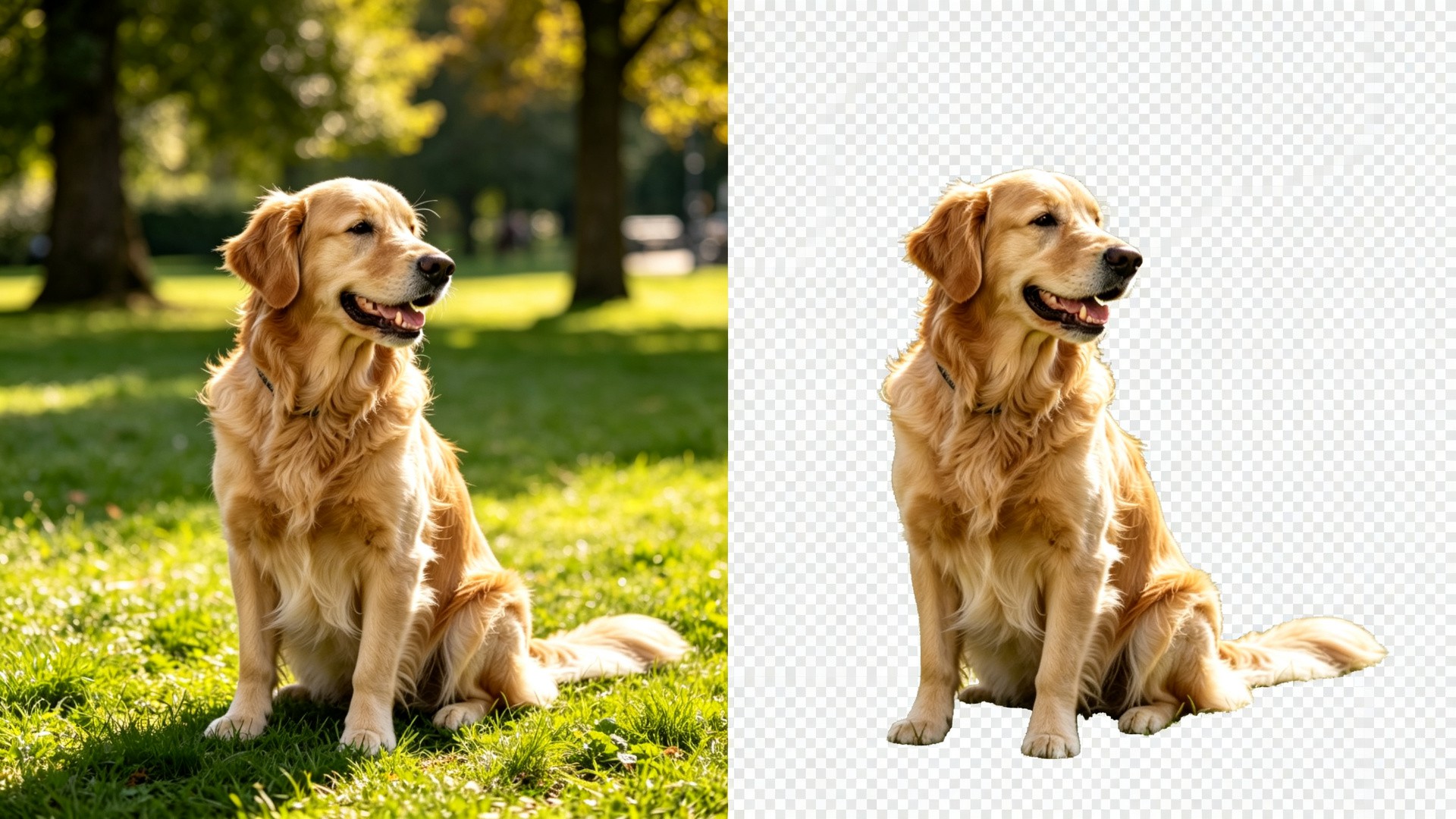
Background removal is one of the most frequently requested image editing tasks across digital content creation and e-commerce operations. Whether you are creating product photos with white backgrounds, designing marketing assets, or creating social media content, fast and accurate background cutout is essential. ImageKit AI-powered online background removal tool has become the top choice for designers, e-commerce sellers, and content creators, thanks to its browser-based local processing, free watermark-free exports, and high-definition output quality.
This comprehensive guide breaks down everything you need to know about ImageKit Background Remover — its features, how to use it, real-world applications, and advanced tips to maximize your image editing workflow efficiency.
What is ImageKit Background Remover?
ImageKit Background Remover is an AI-powered online tool that removes backgrounds from images automatically. Developed by the ImageKit team, it uses advanced computer vision algorithms to detect the main subject in any photo — people, products, animals, objects — and precisely separate it from the background, delivering a clean transparent PNG output.
Unlike traditional cutout methods that require manual tracing around edges, ImageKits AI background removal is fully automated. Upload an image and get a professional-quality cutout in seconds. Most importantly, all processing happens locally in your browser — your images never leave your device, ensuring complete privacy and data security.
7 Core Advantages of ImageKit Background Removal
With so many background eraser tools available, what makes ImageKit stand out? These seven key features make it one of the best online background removal solutions in 2026.
1. 100% Browser-Based Local Processing, Privacy-First
This is ImageKits most distinctive advantage. Unlike most online tools that upload your photos to cloud servers for processing, ImageKits AI model runs directly in your browser. All image processing happens on your device, and your image data never gets transmitted anywhere. For users working with product designs, private photos, or sensitive content, this means absolute data security and zero privacy concerns.
2. Completely Free with Unlimited Usage
The core ImageKit background removal functionality is 100% free. There are no daily limits, no credit requirements, and no account registration needed. For individual users and small teams, this means professional-grade cutout capabilities at zero cost — no expensive design software subscriptions required.
3. No Watermarks, HD Quality Export
Many free background removal tools add watermarks to output images or limit export resolution. ImageKit promises a watermark-free, ad-free user experience with full-resolution HD exports. Processed images retain their original dimensions and quality, meeting commercial use standards.
4. Smart AI Recognition with Precise Edge Detection
Powered by deep learning algorithms, the AI intelligently identifies subject edges even in complex scenarios — including fine hair strands, transparent objects, and irregular shapes that traditionally challenge cutout tools. Portraits, apparel, jewelry, electronics, and more achieve near-perfect edge separation results.
5. Instant Access, No Installation Required
As a pure web-based tool, ImageKit requires no software downloads, installations, or plugins. Open your browser, visit the website, upload an image — three steps and you are ready to go. It works seamlessly on Windows, Mac, Linux, and even mobile devices, delivering true cross-platform productivity.
6. Batch Processing Support for Maximum Efficiency
For e-commerce operations and designers handling large volumes of images, batch processing is essential. ImageKit supports uploading multiple images simultaneously for background removal, processing several at once to dramatically boost workflow speed. Batch mode maintains the same privacy advantage of local processing.
7. Seamless Integration with ImageKit Media Management Platform
If you are an ImageKit enterprise user, background removal integrates directly into your media library workflow. Right-click any image to remove its background in one click. Processed versions save automatically with version history and rollback support. Combined with ImageKits CDN delivery, image optimization, and API capabilities, it forms a complete image processing pipeline.
How to Remove Background Online with ImageKit: 5-Step Complete Tutorial

Removing image backgrounds with ImageKit is straightforward — even complete beginners with no design experience can master it quickly. Here is the detailed step-by-step guide.
Step 1: Access the ImageKit Background Removal Tool
Open ImageKits official Remove Background tool page in your browser. No registration or login required — you land directly on the workspace. For best performance, use a modern browser like Chrome, Edge, or Firefox.
Step 2: Upload Your Image
Click the upload area or simply drag and drop your image into the page. ImageKit supports common formats including JPG, PNG, and WEBP, and handles high-resolution files well.
Pro tips for best results:
- Images with high contrast between subject and background work best
- Well-lit, sharply focused photos deliver more accurate edge detection
- Avoid situations where subject and background colors blend together
- For product photography, shoot against a solid color backdrop for cleanest results
Step 3: Automatic AI Processing
Once uploaded, the AI algorithm immediately starts detecting the subject and removing the background. The whole process typically takes just 2-5 seconds, depending on image size and device performance. You will see real-time progress with no manual intervention required.
Step 4: Review and Fine-Tune (Optional)
When processing completes, the page displays your image with the background removed — the checkerboard pattern indicates transparent areas. Carefully inspect the edges and verify that your subject is complete and intact.
For most images, the automatic AI result is already perfect. For especially complex edges (such as voluminous hair or transparent materials), use the built-in refinement tools to touch up specific areas — restore accidentally removed parts or erase remaining background fragments.
Step 5: Download and Export
Once you are satisfied with the result, click the download button to save your image. The output is a PNG file with a transparent background, preserving the original resolution. The downloaded file is ready to use directly on e-commerce platforms, in design software, or for social media publishing.
6 Key Use Cases for Background Removal
Background removal is a fundamental yet incredibly versatile image editing technique. Here are the six most common applications for ImageKit Background Remover.
1. E-Commerce Product Photography
This is the largest use case for background removal. Major marketplaces like Amazon, eBay, and Shopify require pure white backgrounds for main product images. With ImageKit, remove the original background in one click and replace it with clean white — instantly creating platform-compliant product hero shots, an essential skill for every online seller.
2. Marketing Posters and Ad Design
Designers creating banners, posters, or social media ads frequently need to cut out products or people and place them onto new background scenes. Transparent PNG assets integrate seamlessly into any design composition, dramatically improving design efficiency and creative flexibility.
3. Social Media Content Creation
Creators on Instagram, TikTok, Pinterest, and other platforms use background removal for all kinds of creative content — floating subject effects, photo collages, branded stickers, story templates, and more. Transparent background assets are the building blocks of creative compositing.
4. ID Photos and Profile Avatars
Need to change the background color of an ID photo? Use ImageKit to remove the original background and replace it with standard red, blue, or white backgrounds — done in seconds. Resume headshots and social media profile pictures also look more professional with clean, purpose-matched backgrounds.
5. Presentations and Educational Materials
When building PowerPoint, Keynote, or course slide decks, removing image backgrounds creates cleaner, more professional pages. Product shots, people photos, and icon graphics with removed backgrounds can be freely layered and arranged for a polished visual result.
6. UGC and User Upload Processing
For platform products, user-uploaded photos often have cluttered, inconsistent backgrounds. By integrating automatic background removal via the ImageKit API, you can standardize user-generated content (UGC) at scale, automatically replacing backgrounds with on-brand styling and elevating overall platform visual quality.

AI Background Removal Technology Trends in 2026
Background removal technology is evolving rapidly, with several clear trends emerging in 2026.
Continuously Improving Edge Precision
New-generation AI models keep improving on historically challenging scenarios — fine hair, transparent materials, furry objects — approaching and even surpassing manual cutout quality. Expanded training data and algorithm refinements produce increasingly natural edges with virtually no visible processing artifacts.
From 2D Segmentation to Semantic Understanding
Early cutout tools performed pixel-level edge separation. Newer AI models understand image semantics — recognizing individual subject components and even spatial relationships. This enables smarter selections, more accurate layering, and expanded post-processing possibilities.
On-Device AI Becomes Mainstream
Thanks to model lightweighting advances, more AI image processing features run locally on user devices. ImageKits in-browser processing exemplifies this trend. On-device AI protects privacy while reducing server costs, making genuinely free tools viable.
Deeper Workflow Integration
Background removal is evolving from a standalone tool feature into an embedded step within design and production workflows. E-commerce platforms, CMS systems, and design software are all building in AI cutout capabilities — users never need to switch tools, and efficiency improves further.
Video Background Removal Goes Mainstream
Following still images, video background removal is the next growth area. Virtual backgrounds and real-time green-screen effects are booming in video conferencing and short-form video creation. AI video cutout is widely expected to be the next breakthrough category.
Frequently Asked Questions
Is ImageKit Background Remover really free?
Yes — the core version is 100% free with unlimited usage, no watermarks on exports, and full resolution output. Advanced batch processing and enterprise API features require a paid subscription, but the free tier covers all typical personal user needs.
Do my images get uploaded to a server?
No. ImageKit Background Remover uses browser-based local processing technology. The AI model runs on your device, and image data never gets uploaded to any server. This is its biggest difference from most online cutout tools — and a major advantage for privacy security.
What image formats are supported?
JPG, PNG, and WEBP are all supported. Output is a PNG file with alpha transparency channel, preserving original resolution. If you need a different format, convert the downloaded file with any standard image converter.
What if the result is not perfect?
The automatic AI result works great for the vast majority of images. For challenging edge cases, try these: 1) Use a higher-resolution source image; 2) Ensure good contrast between subject and background; 3) Use the built-in refinement brush to manually touch up edges.
How many images can I process in batch?
The online tool supports multiple simultaneous uploads. The practical limit depends on your browser memory — typically a dozen or more images work fine. If you need to process hundreds or thousands of images, consider ImageKits enterprise API service.
Does it work on mobile phones?
Yes. ImageKits web version is mobile-optimized and works in mobile browsers. However, given screen size and precision constraints, complex images are still best handled on desktop.
Conclusion
Background removal may seem like a simple feature, but it touches daily workflows across e-commerce, design, marketing, content creation, and many other fields. A great cutout tool saves individuals and teams enormous amounts of time.
ImageKit Background Remover stands out as a top online background removal solution for 2026, thanks to its privacy-first local processing, free watermark-free experience, AI-grade precision, and seamless integration with the broader ImageKit media management platform. Whether you occasionally need to cut out a few images or process hundreds of assets daily, it delivers real value.
No installation, no registration, no payment — professional-grade AI background removal right in your browser. Experience the power of ImageKit background removal today!